19 accessibility tools, 8 one-click modes, real sign-language translation, AI image description, and full white-label branding — all live today unless marked otherwise.
Accessibility Toolbar
19 Tools, Adjusted Live in the Visitor's Own Browser
No changes to your site's code — every visitor customizes their own experience, and it's remembered for their next visit.
Vision & Blindness
Screen Reader
Reads page content aloud as visitors tab or click, at 3 reading speeds.
Page Structure Popup
Lists every heading and link on the page for fast keyboard navigation.
Virtual Keyboard
An on-screen keyboard for typing into any field without a physical one.
Low Vision & Magnification
Aa
Bigger Text
Scales page text up for easier reading.
B
Font Weight
Adjusts text boldness for legibility.
Letter Spacing
Widens spacing between letters.
Line Height
Adds breathing room between lines of text.
Text Alignment
Changes how paragraph text is aligned.
Text Magnifier
Hover any text to see it enlarged in a floating lens.
Big Cursor
An oversized pointer, in 6 color choices.
Saturation
Adjusts color intensity across the page.
Contrast
Light and dark high-contrast modes.
Plus independent text, title, and background color overrides, with 16 swatches each — for visitors who need a specific color combination to read comfortably.
Reading & Cognitive Support
Aa
Dyslexia-Friendly Font
Swaps the page's font for one designed to be easier to read with dyslexia.
Reading Mask / Line
Dims everything except a band around the cursor, to help track a line of text.
Photosensitivity & Distraction Reduction
Highlight Links
Outlines every link so they're easy to spot.
Video Controls
Pause or fully hide videos on the page.
Mute Audio
Mutes host-page video/audio (never the toolbar's own spoken feedback).
Hide Images
Hides non-essential images for distraction-free reading.
Each bundles a preset of the tools above for a specific need.
Epilepsy-Safe Mode
Blurred Vision Mode
Mental Disability Support
Motor Disability Support
Color Blindness Mode
Reading Difficulties Mode
ADHD Mode
Blindness Mode
AI Image Description Beta
Every Image, Described Aloud
Blind and low-vision visitors turn this on (keyboard shortcut Ctrl + /, or a toolbar click) and pick a detail level. Isharat scans every image on the page, has an AI look at each one, and applies a real spoken and written description as the image's actual alt text — so it works with the visitor's own screen reader, not just Isharat's.
Reads and transcribes text inside images, in both Arabic and English — infographics, scanned documents, posters, and org charts
Three selectable detail levels — short, medium, detailed
Existing human-written alt text is respected by default, with an optional switch to override it
Automatic decorative-image detection, so clutter isn't described
Plug-and-play AI model — Google Gemini today, swappable as the field improves
Three Detail Levels, Chosen by the Visitor
Short / Standard — a one-sentence summary for fast page scanning. Roughly 7 in 10 visitors pick this, and it's the default.
Medium — adds spatial relationships, visual context, and key details. About 1 in 5.
Detailed / Dense Text — a full transcription and visual breakdown of infographics and complex diagrams, in correct reading order. About 1 in 8.
Detail-level preferences measured on Beta traffic through 17 August 2026.
Human Alt Text Is Protected by Default
If someone already wrote a proper alt description for an image, Isharat leaves it exactly as it is — human accessibility work shouldn't be silently overwritten by a machine. Visitors who want more can flip an optional "Override human alt text" switch, which asks the AI to look at the image afresh, useful when they need deeper visual context or want the text inside the image transcribed.
What to expect: the first 5 images on a page are described and applied in about 12.3 seconds, so a screen reader can start exploring immediately while the rest finish in the background. On repeat visits the descriptions come back from cache in 19 ms.
Beta today — built and working end-to-end, currently running on staging infrastructure rather than promoted across every customer site.
FT-1Detail selector & alt-text override switch
Widget screenshot over an organizational-chart image, showing the three detail-level buttons (Short / Medium / Detailed), the "Override human alt text" toggle in its active state, and a callout on the transcribed Arabic and English text inside the image.
1200 × 750 px · 16:10 · WebP + PNG · EN and AR variants
Sign Translation Engine Beta
Sentence Meaning, Sign Grammar, and a Way to Tell Us We Got It Wrong
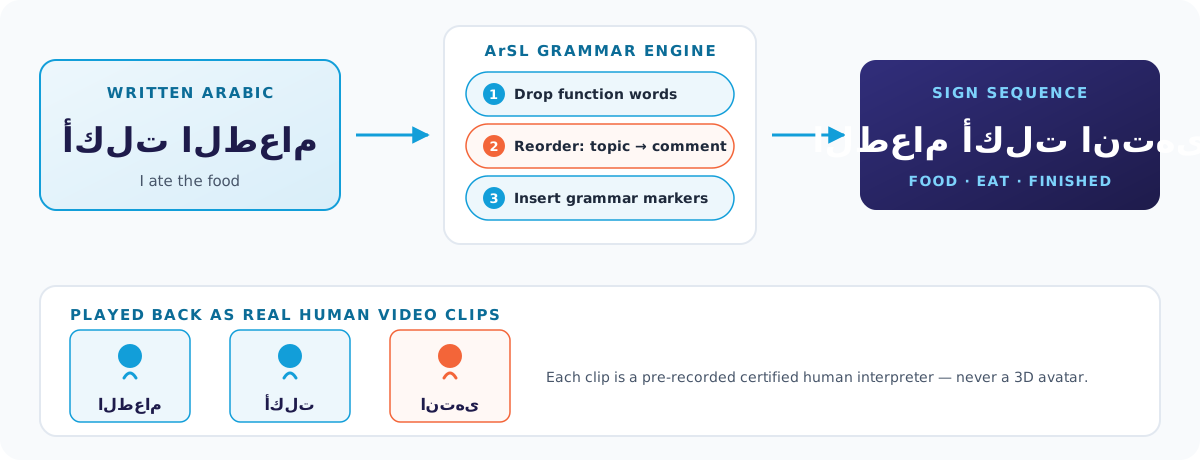
Sign language isn't word-for-word replacement. Isharat analyses the whole sentence to pick the right sign for ambiguous words, then reorders it into real Arabic Sign Language grammar before anything plays.
Arabic Sign Language Grammar
The engine drops articles, conjunctions, and prepositions that sign language doesn't use; reorders the sentence into natural topic-then-comment structure; and inserts grammatical markers such as انتهى for completed past actions and لا for negation.
Dialects and Other Languages
Built to accept any Arabic dialect — Egyptian, Gulf, Levantine, Maghrebi — normalise its regional wording, and translate the meaning into standard Arabic Sign Language. It's also built to take text in other source languages and render the meaning in ArSL.
Evaluated on our published 200-sentence, 5-dialect benchmark. Coverage beyond Arabic is under active testing.
Word-Sense Disambiguation
Arabic words spelled identically can carry different meanings, and a different meaning can call for a different sign. The engine reads the surrounding sentence to choose, instead of guessing or asking the visitor every time.
Deaf Viewers Rate Every Translation
Below each sign video there's a three-level comprehension bar. It takes one tap, and it's the most direct quality signal we have — because the people answering it are the people the translation is actually for.
🙂 Good / Accurate😐 Partially Understood😕 Unclear / Not Understood
Shown here as a static example — the live version appears under the video inside the widget.
Ratings Feed the Engine
Real Deaf comprehension ratings drive our translation-quality work — which sense the engine picks for an ambiguous word, how natural the ArSL ordering feels, and which gaps get prioritised.
Unclear Translations Self-Correct
A translation marked 😕 Unclear automatically deactivates its own cached entry. The next person to request that sentence gets a freshly generated translation instead of the one that was just reported as wrong.
FT-2Live 3-level feedback bar, in the widget
Real screenshot of the Isharat sign player with a video paused mid-sign and the three-level feedback bar visible beneath it. Needed in both the English and Arabic widget interfaces.
1200 × 900 px · 4:3 · WebP + PNG · EN and AR variants
White-Label Branding
Built for B2B and B2G
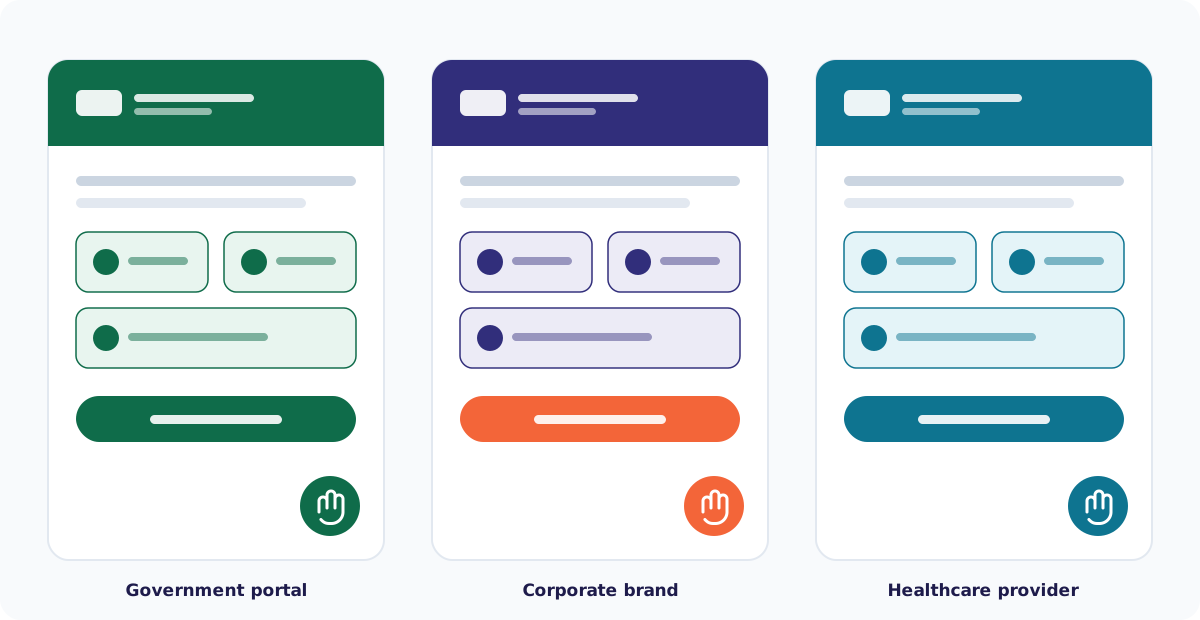
Every part of how the widget looks and presents itself can be customized per subscribing website — so a government ministry or large enterprise gets a widget that matches their own visual identity, not a generic third-party add-on.
Full 9-color palette — primary, secondary, success, warning, error, text, background, links, and cards — applied live, no widget rebuild needed
Two custom font families, configurable per site
Dual logo branding — one asset for the widget header panel, another for the floating trigger button, each with its own hover state
Custom rich-text "About" tab, copyright footer, and starting language, per embed
Configurable word limit per translation request, set per customer
Example: a Saudi DGA-styled trigger icon, matching a government portal's own green brand palette.
The same widget, configured three ways. Colors, logos, and trigger styling are set per subscribing site.
Arabic Sign-Language Translation Deserves Its Own Page
Real human interpreters, Egypt's national dictionary, and honest coverage numbers — read the full breakdown.